Posts

Two solar panels into one power station combination!

Image
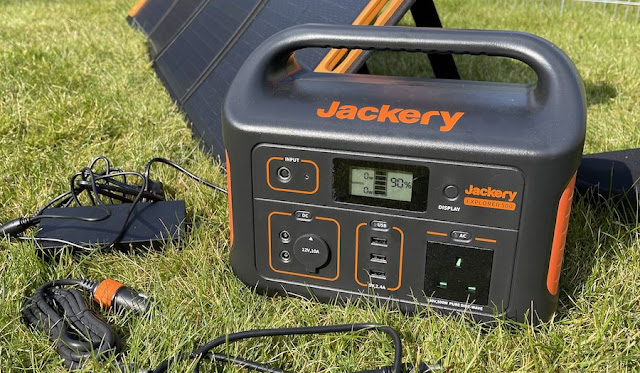
As many readers will know, I've been experimenting with power stations and solar panels recently. And there's a particular configuration that I've been delighted with and which I thought worth sharing. You see, I have two Jackerys, one 500Wh (that charges my phones and tablets), one 1000Wh (i.e. 1kWh, that I keep stocked for domestic emergencies in these troubled times), and two matching (Jackery) Solar Saga 100 (100W) panels. The idea is that this pair of panels is the perfect (max) 200W input into the Jackery 1000, to charge it up. Now, while this works very well - in sunny conditions it can charge the Jackery 1000 completely from scratch in a day - how should I charge the Jackery 500? A separate panel for this? That would end up costing even more, plus it's an extra panel to set up and position. My solution is to daisy-chain the devices, in effect. Here's the set-up: So the panels (with extra Jackery extension cables, shown in orange, to allow them to be out wher...

Data points: Sony Xperia 5 iv imaging versus iPhone ProRAW

Image
Actually reviewing the Sony Xperia 5 iv is tricky, since it's so relatively similar to the 5 ii and 5 iii in previous years. But that's not a criticism per se, since I absolutely love the form factor and 'bells and whistles' specification. And you do get Qi charging this year, which I appreciated very much. I attempted a few YouTube Shorts covering the device: Xperia 5 iv overview No zoom gap in the 5 iv's camera system Trying to demo Dynamic Vibration But it proved all but impossible to look at imaging in YouTube Short format, hence this blog post.  They don't look much, but it's a very refined camera combination. Note the white balance sensor and the T* anti-reflection coatings... I've taken a handful of likely subjects and test scenes and shot them with the Xperia 5 iv and my 'gold standard' Apple iPhone 12 Pro Max with ProRAW toggled on. This comparison is made even more valid by the match of camera specs, right up to the same 2.5x telephoto ...

Some backward steps in the iPhone 14 Pro Max

Image
[Updated with a few new data points and musings, 20 Sep 2022] Now, I know you're going to think I'm being a little contrary - and I possibly am. But as someone who's been saving their pennies for the 256GB iPhone 14 Pro Max for a year or so (to replace my existing 12 Pro Max), I've been underwhelmed by some of the things Apple has done for this generation of their flagships. Now, I appreciate that the chipset is faster and the display is more adaptable (going down to 1Hz, enabling a form of optional Always on Display), so there are some real positives. But, after playing with the iPhone 14 Pro Max myself and after watching many reviews and camera comparisons, I can't help but feel that some of the 'improvements' aren't necessarily so. Let me explain, I have four things I want to comment on: 1. Dynamic Island gives less screen real estate, not more This seems counter-intuitive, but it's true in practice. Although the notch in previous iPhones used mo...

When the Mac's 'space to quick view' function stops working - the solution!

Image
This is a really odd Mac OS bug - I'm so reliant on pressing the space bar in Finder to look at or play files (e.g. PDFs or MP3s or MP4s) that, when it stopped working altogether, I was thrown. A dialog comes up with information on the file but there's no preview. At all. And restarting Mac OS doesn't help. Clearly something is well and truly stuck at the system level. Happily, a pointer online led to a quick fix and I thought I'd share it here.  Start Activity Monitor (you'll find it in Applications/Utilities) On the View menu, choose ' All processes ' Use the find tool (magnifying glass at the top right of the window) and type in 'Find' The process ' QuickLookUIService ' will show up. This is the system process which is corrupted/stuck/foobar(!) etc.  Double click this and choose ' Force Quit ' Done! Next time this happens (it gets stuck for me about once a month), at least you can fix it in seconds without having to worry about re...

Musings on fancy ancient stonework!

Image
You have to wonder at the cost of labour back in the 1500s, along with priorities in the stonework business. And I apologise in advance if I'm about to be something of an architecture heathen. You see, I was visiting York and gazing up at the Minster, destroyed and rebuilt a number of times over the last 1000 years. And, while I was hugely impressed by the size of the thing (and yes, we went inside for the tour), as my eyes focussed in on some of the details, I started to notice something. Details on the details. And those details had details added to them. Almost fractal. As an example, take one of the very smallest spires on the Minster, only a few feet high and positioned a hundred feet off the ground. One of them is helpfully displayed on its own inside: I can't really imagine the discussions between the foreman of the time and the stone masons, perched possibly precariously on 1500-era scaffolding, 100ft off the ground.  "Yes, can you put in 50 little spires, each 5ft...

Review: UGREEN 100W GaN Fast Charger

Image
(originally published on the All About sites) Sent over for me to test (disclaimer) is the UGREEN 100W GaN Fast Charger, designed to charge just about any mobile tech you may have - and then some. It's not cheap, at £80(!) ( UPDATE : Now £50 or so!) - but it might be a genuine space and complexity saver in your office or kitbag. One of the chief attractions of GaN ( Gallium Nitride ) technology is that the transistors can work at higher voltages and temperature than traditional silicon chips - meaning that power adapters (as here) can be smaller and lighter for a given power rating. You can gauge the diminituve size (perfect for travel bags?) from the shot in my hand below: It's all built-in here, no flying leads, but that's OK, especially for a travel adapter. I'll come to the almost unbelievable specifications in a moment, but for now here are output ports: three USB Type C and one USB A, which is about right for a typical work load of devices in 2022: (I should note ...

How to: set up a sane and future proof password and secrets management system

Image
Listening to all the issues and problems besetting popular 'password managers' on various podcasts, not least their creators selling up and handing the software over to 'big tech', not least the task of juggling compatibility with the various desktop and mobile browsers, not least the navigating of new methods of ID and 'web 3.0'... I was struck that my chosen system is still the best way forward.  For me, anyway, if not perhaps 'normobs'. I'm a firm believer in keeping things simple. And also in using 'open source' software where possible as it avoid commercial outfits trying to shoehorn in extra features that 'make them money'. So. Here's what I've done since 2010 - and have set up for my family and friends. No need to have a piece of software from the exact same company that runs on every platform, no need to juggle syncing between devices. You just have one 'encrypted blob of data' in the cloud. I keep it in Google...

Review: UGREEN Travel Organiser Bag

Image
 (originally published by me on the All About sites) UGREEN sent this organiser bag across and it has proved an excellent addition to my kit-case, replacing about three other cheap mini-bags. There's no faulting the materials, with durable plastic weave and really tough branded zips that look like they'll last a lifetime. Both zips are two-handed, i.e. can be opened from either end, sealing closed each of the two main compartments: Of course, quite what one might put in each of the straps and mesh compartments shown is a personal affair - below I've shown my personal 'first cut', but doubtless things will get moved around through monthly use. I do seem to have an inordinate number of small adapters and USB memory disks, so they all ended up together, plus I have bulky adapters for Type C and Lightning to HDMI and to other standards, and these needed a bit of lateral thinking! Bulkiest of all are my longer leads and generics like HDMI extensions - and I ended up havi...

Review: Jackery 500 Power Station

Image
(originally published on the All About sites) Following my look at a  folding 120W solar panel  and a  12V 65W adapter , it's time for the pièce de résistance - a way of 'caching' charge and dispensing it as needed. Traditionally in the mobile world we'd be looking at a high capacity power bank, and in effect this is the case - except that here we're talking 137,000 mAh (at phone voltages), compare that to the 10,000 mAh of the familiar pocket bank. This is a serious, serious bit of kit and includes a 500W inverter. I picked the Jackery after much research - it turns out that there are quite a few similar products out there but in terms of ruggedness and clarity of use, nothing beats the original, the Jackery range. They go up to 2000Wh capacity (and with commensurate outputs - 2kW output - bulk, and price(!)) but I felt that this 500Wh unit is the sweet spot in terms of portability, capacity, and match for the solar panel already reviewed . The unit is made from re...

The Laptop in your pocket (Surface Duo/Duo 2)

Image
 (originally published by me on the All About sites) So yes a bit of an experiment. Writing about the laptop in your pocket ON a laptop in my pocket. In this case the Microsoft Surface Duo 2. No corrections or additions were made on any other device. It has been the dream of every mobile enthusiast for three decades to have a workable laptop, for Office, email, and so on, in a pocketable form. Think Psion, think Nokia Communicators. This is the latest attempt, in 2022!  I have to start with typing speed, since the reduced size and glass experience will be the bottleneck for some people. Both factors affect input speed, of course, though I'd estimate that I get about 70% of my normal input speed, using four fingers rather than the usual six or eight. On a full size laptop keyboard I type at about 40 words per minute, allowing for corrections/backspacing as I go along (I'm a stickler for not having to go back to fix things later!) On the small glass keyboard, it's more like 2...

Getting an automatic Always On Display for the iPhone and iOS

Image
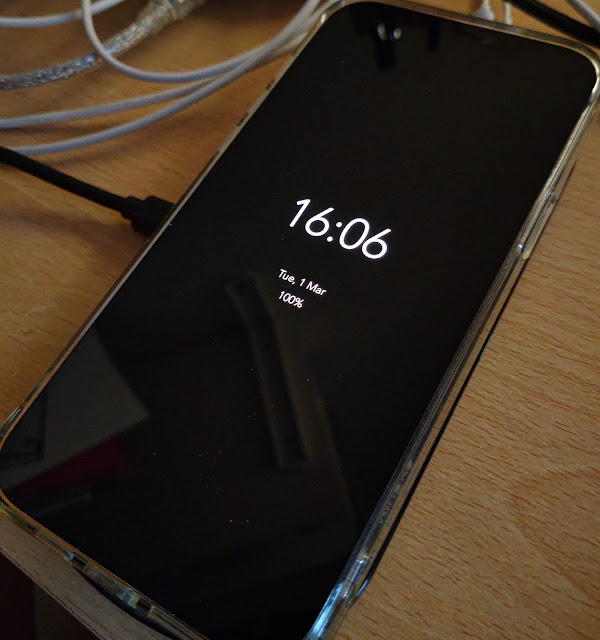
It works. It really does work. How did I not know about this technique (and app?) Anyway, here's my iPhone 12 Pro Max sitting on a Qi charging pad. I put the iPhone on and - bang - up comes a true Always On Display, with date and battery status: Is there a trick? Well, not as such (you may remember convoluted Accessibility techniques for getting AOD on an iPhone), but there are two components to get in place: The app OLEDX from the iOS App Store. It's free unless you want outrageous stuff like fancy colours and weather etc. The latest (iOS 15) Shortcuts application - this is something I've never really dived into in great detail before, but this is a great example of what can be done. So OLEDX is installed on your iPhone? Run it and check it all works. Good. Now run the Shortcuts utility on your phone and then tap on the 'Automation' tab at the bottom: Tap on 'Create Personal Automation'. Tap on 'Charger'. Tap on 'Next'. Tap on 'Open Ap...

Case round-up for the Apple iPhone 13 mini

Image
The iPhone 13 mini is a stunning smartphone, unusual because of its diminutive size yet without compromising any of the internals. But it's still the best part of £700 and needs protecting. As usual for my case roundups, I'll cover a variety of styles, with most samples supplied by MobileFun, kind people that they are. See their  complete range of iPhone 13 mini cases and covers . But on with the individual cases, each link goes to the relevant product page, of course. Spigen Rugged Armor, £20 Spigen cases are rarely the cheapest, but they do offer utterly premium TPU and perfect fit. On the tiny iPhone 13 mini, this feels soooo snug. So many textures too. The main body/back matt finish is just lovely, but it gets better with the ultra-ribbed, grippy sides. The two texture panels on the back look cool, but their function is mainly cosmetic. There's ample face drop protection around the front edges of the case, plus a typical 'air gap' corner design to handle corner ...