Posts

Triple protecting Stainless Steel and Ceramic Shield

Image
I have a very peculiar attitude towards protecting my crown jewels. No, not those , but my smartphone, full of my stuff, signed-in sessions, and secrets. Though the exact device isn't critical, it's currently an iPhone 14 Pro Max, which comes with stainless steel chassis and 'Ceramic Shield' glass. So it's pretty damned tough on its own. (If it was an Android flagship, especially from Samsung or Google, then we'd be looking at aluminium and Gorilla Glass Victus, so still reasonably strong.) The traditional holder of one's smartphone is a pocket, but I find this to be both uncomfortable and impractical, especially when sitting down - try getting a phone out of a jeans pocket when in a car etc. (And don't even mention the unmentionable - keeping a phone in a back pocket, at risk of robbery and destruction.)  So, at the risk of seeming horrendously unfashionable (I don't care any more!), I keep my phone in a slimline vertical belt holster (made by PDair...

(Retro) Review: Microsoft Universal Foldable Keyboard

Image
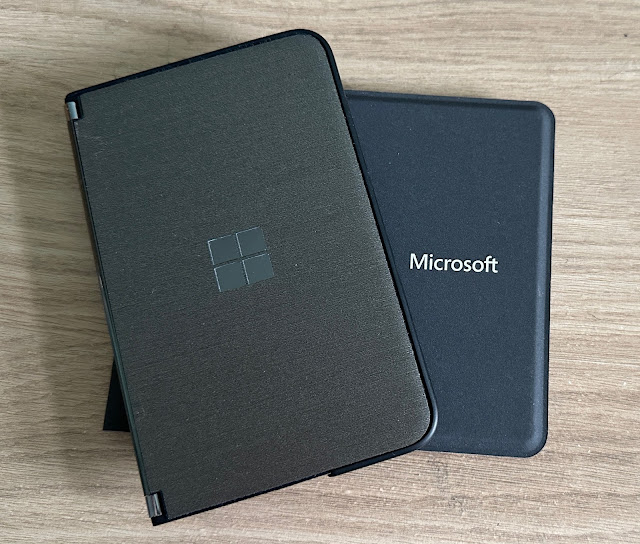
Now this is embarrassing. I've bought and sold and then rebought the same accessory two or three times. And it's this one, from Microsoft, designed originally around the time of Lumia's, so 2012 ish, but with a view to working across all three(!) mobile platforms (now only two, of course). Bluetooth keyboards have gone into and out of fashion over the years, but they're definitely still relevant, thanks to the use of tablets and 'phablet'-style large-screened smartphones, where a wireless full size keyboard can turn the device into a mini-laptop. Microsoft's offering is still ultra-premium, has a few unique features and is worth looking out for, not least having full size keys and yet folding to pocket size without needing hinges and any moving parts. (Well, so there must be a ribbon cable of some kind embedded in the tough textured body, but that's about it...) I'm aware that revisiting this accessory so long after first release means that availab...

Taking photos - Why bother? And If so, When to bother!

Image
So. Mum died about eight years ago, aged 75, and then my dad died at the end of 2021, aged 83. A pretty normal timescale for my parents and for that generation. But, amidst a house full of 80 years of mainly err... junk odds and ends (that took months to sort through), was my mum's prized photo collection. It spanned four bookcases and comprised 100 albums, beautifully indexed and numbered, each with roughly 100 photos in. So 10,000 photos in all to do something with. (one of the few of my 'dad on a cliff path' that I actually kept. He's IN the photo, not a dot on the horizon!) There is no way I wanted my own house to inherit 10,000 physical photos, so the big sort out commenced. Despite taking over a man day, the process turned out easier than I'd expected. You see, in this collection, there were a huge number of: landscape shots of the Cornwall and Devon cliffs and coastal path, usually in grainy gloom flower beds from public gardens visited - so many flower be...

Zoom Heresy(!) - Why phone cameras don't actually need high zoom factors

Image
This is going to sound strange to those reading my camera phone test articles over the last 15 years on various sites, but I contend that phone cameras don't actually need to be capable of more than about 3x zoom . There I said it. Controversial, moi? True, from 2005 through to the present day, even I tested shots at 5x and even 10x zoom sometimes (though I always stayed away from 'silly' zoom factors like 15x and 30x, unlike some YouTubers), where warranted, but only occasionally and with the majority of test subjects at 1x, 2x, and 3x. And with good reason. Here's why. I've been doing some 'rainy day' sorting through my digital photo library, trying to prune out duplicates, test shots, and anything not needed. And in the process, have got a good idea of the gamut of shots that are actually worth keeping - of interest to myself long term or to family in the future. From people to food to pets to nature to landscapes  to transport , and I'll bet th...

Adapting the ShiftCam SnapGrip to an Android phone - successfully!

Image
A week ago I delivered a largely positive review of the SnapGrip, as used with a modern iPhone  (do please go and read it!) And I teased using the SnapGrip with an Android phone, thanks to the inclusion by ShiftCam in the box of a circular 'sticker' of MagSafe magnets. It turns out that this sticker is very substantial and beautifully made - and with one obvious and potentially large caveat, means that SnapGrip is very much 'go' on Android too. Snapping and charging. The idea is that you find the right spot on your Android phone, the centre of its Qi wireless charging coils, in my case by trial and error and using a ruler(!) And you then carefully press on the sticker, which has very strong adhesive. Now, not wanting to devalue my Android test phone, a Samsung Galaxy S20 FE, and also mindful of the fact that when out and about I always keep my phones in TPU cases anyway, I obviously stuck the errr... 'sticker' to the case, not the naked phone. But it all turned ...

Review: ShiftCam SnapGrip

Image
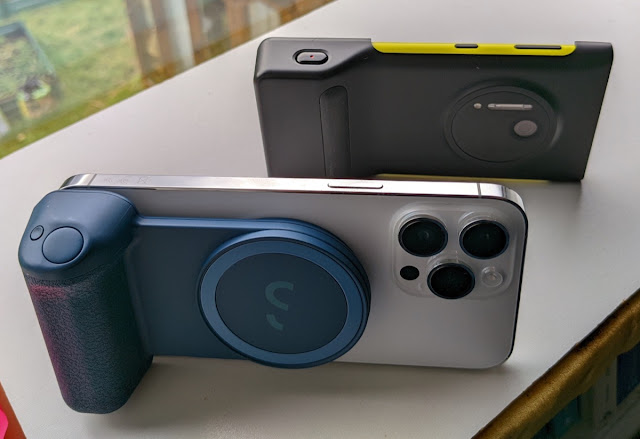
When is a phone camera really a DSLR? When it has a SnapGrip on its back? Not quite, but it kind of feels like it. So. I bought and am reviewing the ShiftCam SnapGrip , £70 in the UK. Partly spurred by fond memories of the Lumia 1020 PD-95G Camera Grip , which it strongly resembles, in functionality and ambition: You'll possibly remember the Lumia 1020, from 2013. The camera phone champion of its day, thanks to a 41MP back-illuminated 1/1.5" sensor, OIS, Xenon flash, and computational oversampling. That all sounds rather special today and indeed the 1020 still works well today, see my detailed imaging comparisons over on the archived All About sites: The famed Lumia 1020 takes on the DSLR Next up... the Lumia 1020 trounces the iPhone 12 Pro Max?! A 2021 'PureView' battle: 808/1020/Pixel/iPhone ...among other pieces. Do go and have a read. The upshot? In ProRAW (unsharpened, un-edge-enhanced, but much larger file size) mode, the modern iPhones comfortably defeat the dec...

To GCam, or not to GCam?

Image
One feature of the Android world over the last five years has been the reverse engineering of Google's first party Camera application, pre-installed in the company's Pixel devices. Popularly known as ' GCam ', the resulting application includes all the multi-frame tricks that Google developed for its Google Glass project, wherein an ostensibly terribly low end camera could produce good results. By combining results intelligently from many captured frames, noise is reduced, detail is enhanced, and so on. Available for free download in many places online, version by version, but start here , GCam can bring extra dimensions to low end camera modules in phones even today, though as the hardware has become better then the 'gap' between manufacturer and GCam results has become smaller and smaller. In my case, I was thinking about using a GCam port on my 2021 Microsoft  Surface Duo 2 , whose main camera is impressive for its size and considering that it's primarily...

The innards/pin-outs of USB Type C

Image
(Lifted from one of my own reviews on AAM and kept here for safe-keeping and reference!) At its heart though, and simplifying slightly, 'Type C' is just a hardware standard - the mechanical jack, and pin layout. The hardware is rated up to 100Gb/s for data and up to 100W for power, though this of course depends on the implementation and quality of cabling used. Type C: is reversible, so works either way 'up' supports USB 2.0, USB 3.0 and USB 3.1 Gen 2 standard protocols (a protocol is a set of rules for what happens when certain signals and voltages are seen on certain pins) supports third-party protocols in 'Alternate Mode' (see below), depending on the hardware involved allows devices to negotiate and choose an appropriate level (Volts, Amps) of power  ( Image from  Microchip )   VBUS (Voltage bus) and GND (Ground) are power lines, obviously. Of note is that VBUS isn't always carrying 5V - the USB protocols allow this to be negotiated upwards if n...

What’s (after) next? Streamlining your day without lists

Image
Yes, yes, the number of things you want to get done each day is legendary. And possibly growing. Work stuff, home stuff, family stuff. OK, for the first, you probably want a formal list and app and oversight, and so on. Making sure everything's done to a deadline. but for the others, home and family? Sometimes a list is just a little over the top. Plus you have to keep it up to date and that can be a hassle. So I have a compromise that I swear by. And it's very, very simple. A way to be more efficient without getting distracted in getting through your chores and tasks is to focus one step ahead. Here's how it works. While doing a specific job, you have the next one in mind too. And when you get round to that one, you have the one after that in mind. And so on. What this achieves is: You don't get distracted while doing the first task since you're aware of 'what's next' (yes, another West Wing reference!) Hopefully the next task has some commonality with...

Experts are often rank amateurs...

Image
I was reminded the other day of a saga from the early 1990s. I was the system manager of a microVAX 'mainframe' (with about 20 terminals around the office) in an engineering firm. And I did some programming to fill in the time, creating tools, but that's another story for another blog entry... Here's the set-up. We were moving offices, about ten miles, and it was up to me to arrange for all the IT equipment to be moved safely. I wanted to put the only fragile bits (mainly the microVAX itself, which was the size of a large suitcase) in my car, wrapped in a duvet, but was told I had to do things officially and the company would pay the experts, in this case DECMove (DEC was a computer company that made the microVAX). (archive snap of a microVAX, from ) So, I contacted DECMove and everything was booked in, at horrible cost (I think many thousands of pounds, in 1990's money, so tens of thousands today).  They arrived on time, I'd already disconnected everything (and...

10 reasons why Windows Phone failed

Image
(From my own post over at AAWP , but compacted, tweaked and preserved here for interest and posterity. Related articles still link back to AAWP, which is still online as I write this.) There's (or 'there was', looking back in 2023!) so much to like about Windows Phone in terms of hardware options, interface, and ecosystem, that you might be surprised, in hindsight, that it failed so badly - in relative terms, compared to Android and iOS. There's no one single reason for this - rather many reasons, with cumulative effect, over the best part of a decade. Here's my - rather damning - list. 1. Too late, too slow Microsoft and Symbian (along with Palm and Blackberry) were smartphone pioneers, of course. I still remember handling the first 'XDA' running Windows Mobile, and recognising that this was the future. That was in 2002, with 'large' touchscreen, a full five years before the iPhone was even announced. So there was momentum on Microsoft's side...