Posts

Showing posts with the label security

Pro tip: Add a six month buffer after buying a new phone!

Image
It's new phone time! Typically a couple (or three) years after you bought the last one. And, happily, the transfer of your data to your new iPhone or Android device went well, using the manufacturer's suggested method (e.g. wirelessly, using a cable, or via the Internet). Most things came across, your homescreen is back to your preferred normal, and all that's left to do is sign into the likes of WhatsApp and any banking apps again. Phew! All done, so you put your old phone on eBay or sell it in some other way. Wrong!  Or at least that's my contention.  Because however well the transfer process (iPhone to iPhone Samsung to Samsung, with Smart Switch, or just things restored from the cloud via your Google account) went, it will only have transferred 99% of your data at best. There are ALWAYS things that get missed. Trust me. In my case, this very year, I was two weeks into my new phone (iPhone 17 Pro Max) ownership when I realised that over 100 photos hadn't come acr...


How security works in Android phones

Image
Guest writer (and friend) Mike Warner chips in with clarification on things that I (and almost everyone else) gets wrong about Android security... In Android there are three levels of security and updates to functionality. From the highest to lowest levels we have: Google Play Services Google Play System Update … and the (often monthly) Android Security Update Google Play Services implements all the Google developed services, such as App Notifications, Location, Advertising, Google Pay and Mapping and is updated by the Google Play Store automatically to fix any security issues or add new functionality. Google Play Services is distributed only to Google Certified Android devices, so some Chinese phones like Huawei and devices running forks of Android, like Amazon Fire tablets, do not contain this module. Without Google Play Services, the OEM has to provide their own App Store and replace the Google defined services with their own set of services to ensure that Android apps expecting th...

When it’s perfectly fine to use a phone that’s ‘unsupported’. And when it’s not!

Image
You'll have heard of the Surface Duo? Running Android, it's a dual screened phone with unique form factor that is being abandoned by its maker, Microsoft, in a month or two's time. Begging the question as to what happens for people using it at that time. In fact, the situation isn't unusual, especially in the Android world. People all over the planet are still using 3, 4, 5, even 6 or more years old phones with nothing really bad happening to them. Manufacturer updates typically stop around the three year mark (more if it's a Samsung, less if it's made by Motorola or a lesser Chinese brand), so it's a valid question to wonder just how safe using these older phones with old operating system versions really is. I realise that this is a topic we keep coming back to on the Phones Show Chat podcast , but for everyone else, here's a primer... and my take. There are various aspects to manufacturer updates that get offered to your smartphone: Operating System (O...

Why I'm so obsessed with phone updates...

Image
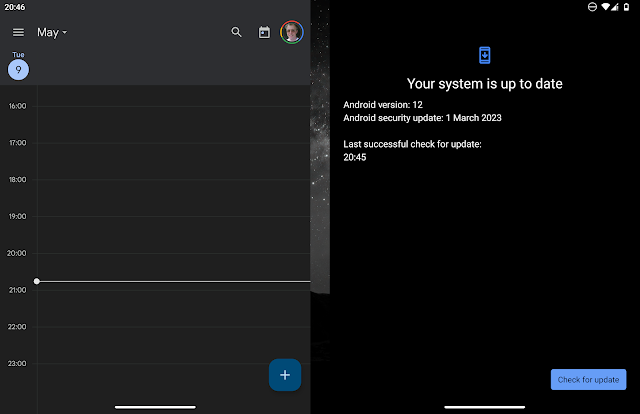
Time after time I hear myself on-air complaining about a late or missing update to a smartphone. In the grand scheme it doesn't matter that much, surely? Why should it matter to a phone user whether their device is on 'March 2023 Android security' or err... 'April'? Or indeed 'February'? Well, it normally doesn't. Certainly most phone users have no awareness of the security status of their devices.  The security-smart answer is that users need protecting from themselves. All operating systems have some bugs, some vulnerabilities, due to their complexity, and exploiting (and fixing) these is a perpetual game of 'whack a mole' played between hackers and software developers.  But if a serious vulnerability is found in Android OS then simply going to a booby-trapped web page or being tricked into downloading and installing something dodgy, let alone knowingly downloading 'cracked' commercial apps and games from the dark web, then the phone ca...

Turning off security - utterly insane

Here's a rant that should strike a few chords with regular geeks out there. The number of PC and Mac applications which state in their installation instructions: "Make sure you do the following before you install the software: Turn off any virus-protection and security software that you may have installed on your computer." - This is from installing Final Cut Express on a MacBook by the way but I've seen plenty of other examples on a PC. I can understand why the developers state this: it's because anti-virus and firewall software might possibly get in the way of the bludgeoning installer that the developer has bodged together. Look, let's get one thing straight: you should NEVER turn off your firewall or anti-virus, unless you REALLY know what you're doing. For example, my router has a built-in firewall and I know it's turned on, but most users wouldn't know this and it's a really bad idea telling them to 'make sure' to turn off their s...